Confidential ·

Contents

Confidential ·

For Andrea Kuch and Dennis Flemming

See a need. (Live: map, posts and jobs) Gather the people. (Live: connections and teams) Prove it got done. (Next: photos, then outcomes)

One month in, airatae.com and app.airatae.com are live on your domain. People can find a need, connect, take on a job and, since 29 September, organize as a team. This is how we got here, what’s left to close Sprint 1, and what we build next: proving the work got done.

Read the story Open the app (opens in a new tab)

Sprint 1 · – · Prepared by Britt Givens, Axle Operations

Make it safe. Make it yours. Make it a real app.

Andrea, Dennis,

Those were the three promises of Sprint 1 when you signed on at the end of August. This page is the full record of how it went, in the order it happened, with nothing rounded up.

The short version: the build is done and live. airatae.com tells the story, app.airatae.com is the product, the 17 security findings are closed and checked, with a two-account test that can be re-run at any time, and the code, the database and the domain are yours.

We also went further than the plan. People can connect with each other and take on individual jobs, and now they can organize as a team and see who’s doing what. The team workspace is early groundwork for Sprint 2, built because the foundation was ready for it.

What’s left of Sprint 1 we do together: a walkthrough on your own phones, a refreshed security sign-off, Privacy and Terms brought up to date, real stories and a final read for the website, and your written OK. After that comes the part that makes Airatae whole: finishing work with photos, and showing everyone what changed.

Thank you for trusting me with it.

Britt Givens

Axle Operations · Vancouver, BC

britt@axleoperations.com

In August, Airatae was a strong idea on a fragile build.

The idea was clear and the foundations were right: your own database, your own Google sign-in, your own code. Almost everything on top needed work. This is the honest picture from the proposal, next to where each part stands today.

  • 56,000

    lines of code, and 44% of them never ran

    Counted by file, 166 of the 354 files behind the app’s screens were never loaded.

  • 17

    security findings

    5 critical, 5 high, 4 medium, 3 low.

  • 49

    database change files that couldn’t rebuild the database

    None matched the live history by version number, and four live tables had no file at all.

August to today

The August bars are the proposal’s own estimate of how far along each part was. Today is described in words, not a new percentage.

PartAugustToday
Explore & post Map, location, create flow 62% Live: the Explore map and a list view, for everyone, your network or just your own; a centered Create button that starts with “I need help” or “I’m offering help”; and claim, start and finish for helpers. Grouped pins, and the final action lists for four of the five categories, are Sprint 2.
Organize & complete Collaboration, tasks, roles, photo completion 14% Organizing is live: teams with invitations, roles, tasks and progress. Completing work with a photo is Sprint 2.
Outcomes & profile The record of what happened, and who took part 18% Profiles show your impact: what you’ve done, what you’re doing, what you posted and your teams. The outcome record, and outcomes on profiles, are Sprint 3.
Security & privacy Who can see and change what 28% All 17 findings closed, one more privacy fix added, 54 of 54 checks passing.
Phone experience Layout, tap targets, installable 22% Installs from a link, phone-first layouts, and keeps people signed in on weak connections. The walkthrough on your own phones is the last check.
Ownership & hosting Your repo, your database, previews, rollback 45% Off Lovable. Your GitHub, a private preview link for every code change, a way back from every release, and a database that rebuilds from one baseline plus the small changes since.

The plan, and what you signed

Three sprints, with a retainer running alongside. You signed on for Sprint 1 and the retainer; Sprints 2 and 3 are proposed, and yours to decide.

  • Sprint 1 Foundation & rework Weeks 1–4 · $5,180 Signed
  • Sprint 2 Close the loop Weeks 5–9 · $6,240 Proposed
  • Sprint 3 Outcomes, polish, launch Weeks 10–13 · $2,810 Proposed
  • Retainer $1,250 every two weeks Signed

: Sprint 1 built, close-out next.

Weeks are estimates and flex with your feedback. The order doesn’t.

Thirty days, in the order they happened.

We took the keys first, made it safe before building anything new on top, then made it a real app. Changes to the code were built separately and, as a rule, checked on a private preview link before they went live.

  1. Took the keys.

    Moved Airatae off Lovable: the code now maintained directly in your GitHub, hosting on Vercel, and airatae.com served from the new setup the same evening. Lovable’s branding came out and the Airatae mark went in.

  2. Locked the doors that mattered.

    Closed the critical, high and medium security findings. Moved keys out of the code, rotated and restricted the map key, capped uploads by size and type, upgraded the database engine (Postgres) to version 17, and wrote Privacy and Terms pages.

  3. Finished the security list.

    Closed the last low findings: database rules and indexes tidied, real page titles and descriptions, a branded “page not found” page, and public Privacy and Terms pages. Also fixed the homepage video, which had never played on the live site.

  4. Proved it with two accounts.

    A two-account test that re-checks 14 of the 17 findings against the live app (53 checks then, 54 now); the other three were confirmed from the project’s own settings and health checks. Then a one-page security sign-off, and the unused prototypes and dead code retired.

  5. Made the database rebuildable.

    Replaced 49 out-of-date database change files with one clean starting file, built a fresh database from it, and checked it matched the live one.

  6. One look, everywhere.

    One palette, one type scale, and real Pill and Glass components (the rounded buttons and see-through panels) across the app, fixing problems with keyboard use, contrast and phones set to reduce motion on the way.

  7. Became an app.

    Installable from a link, with an offline page and a one-time install guide after first sign-in. Password reset got a real page (every reset used to end on a “page not found” error), and new accounts stopped hitting dead ends.

  8. A new airatae.com.

    Rebuilt the website around the map, with new photography and a hero film. Hid contact details on needs from anyone not signed in.

  9. Tougher on phones.

    Installed apps now survive updates, people stay signed in through weak connections, and the map stops draining batteries. The code every app screen shares got 84% smaller.

  10. Two front doors.

    airatae.com for the story and app.airatae.com for the product, with sign-in links that keep people on the right one. The new website went live the same night.

  11. The app, reorganized.

    Explore, Create and Dashboard, with Create in the center. A muted dusk map, tidier profiles and settings, mutual connections, and helpers who can claim, start and finish a job. Sprint 1’s build was complete.

  12. The website, polished.

    A sharper hero film with a proper ending, a phone that zooms from the world into the app icon, and a real layout for phones held sideways.

  13. , morning

    Working together, live.

    The team workspace: public or private teams, invitations, roles, tasks and progress, team updates and notifications. Released after a full review pass and its fixes.

  14. , afternoon

    Who’s doing what, at a glance.

    Explore can show everyone, your network or just your own, as pins or as a list. The dashboard opens on your impact and what needs you, profiles show the work you’ve done, and posting starts with “I need help” or “I’m offering help”. Who took on a job is now visible only to that person, whoever posted it and the taker’s connections.

Next: prove it got done

Everything Sprint 1 promised, and where it stands.

These are the proposal’s Sprint 1 lines, word for word, next to what was built. Ten are delivered and live, five with a small follow-up we finish at close-out. The eleventh is the walkthrough we do together.

Make it safe

  1. “Fix all 17 security findings, then prove it with a two-account test”

    Delivered

    All 17 closed. A two-account test re-checks 14 of them against the live app and can be re-run at any time; the other three were confirmed from the project’s own settings and health checks.

    Refresh the written sign-off to cover everything added since 8 September.

  2. “Rotate exposed keys, lock down file storage, real page titles and legal links”

    Delivered

    Keys moved out of the code, the map key rotated and limited to your domains, uploads capped by size and type, real page titles, public Privacy and Terms pages.

    Update the Privacy and Terms wording to match today’s features.

Make it yours

  1. “Move off Lovable: your GitHub, Vercel hosting, private preview links”

    Delivered

    The code is kept directly in GitHub now, and your repository there is the official copy. The site and app run on Vercel, every code change gets its own private preview link, and every release keeps the version before it ready to switch back to.

    Note: hosting sits under Axle’s Vercel team for now, with a documented path to move it into an account of your own.

  2. “Split airatae.com from app.airatae.com, both on your domain”

    Live since 23 Sep

    The website on airatae.com and the app at the root of app.airatae.com, with sign-in links that always land on the right one.

  3. “Database baseline rebuilt so it can be reproduced and safely changed”

    Delivered

    The 49 out-of-date database change files became one clean starting file, the baseline. A fresh database built from it matched the live one across a 2,967-line comparison of its structure. New features now add small changes on top, each easy to check.

  4. “Retire the 44% of code that never runs, and the prototypes that mislead”

    Delivered

    The unused prototypes and dead code are gone, and seven leftover server functions were switched off, so the product only claims what it does.

Make it a real app

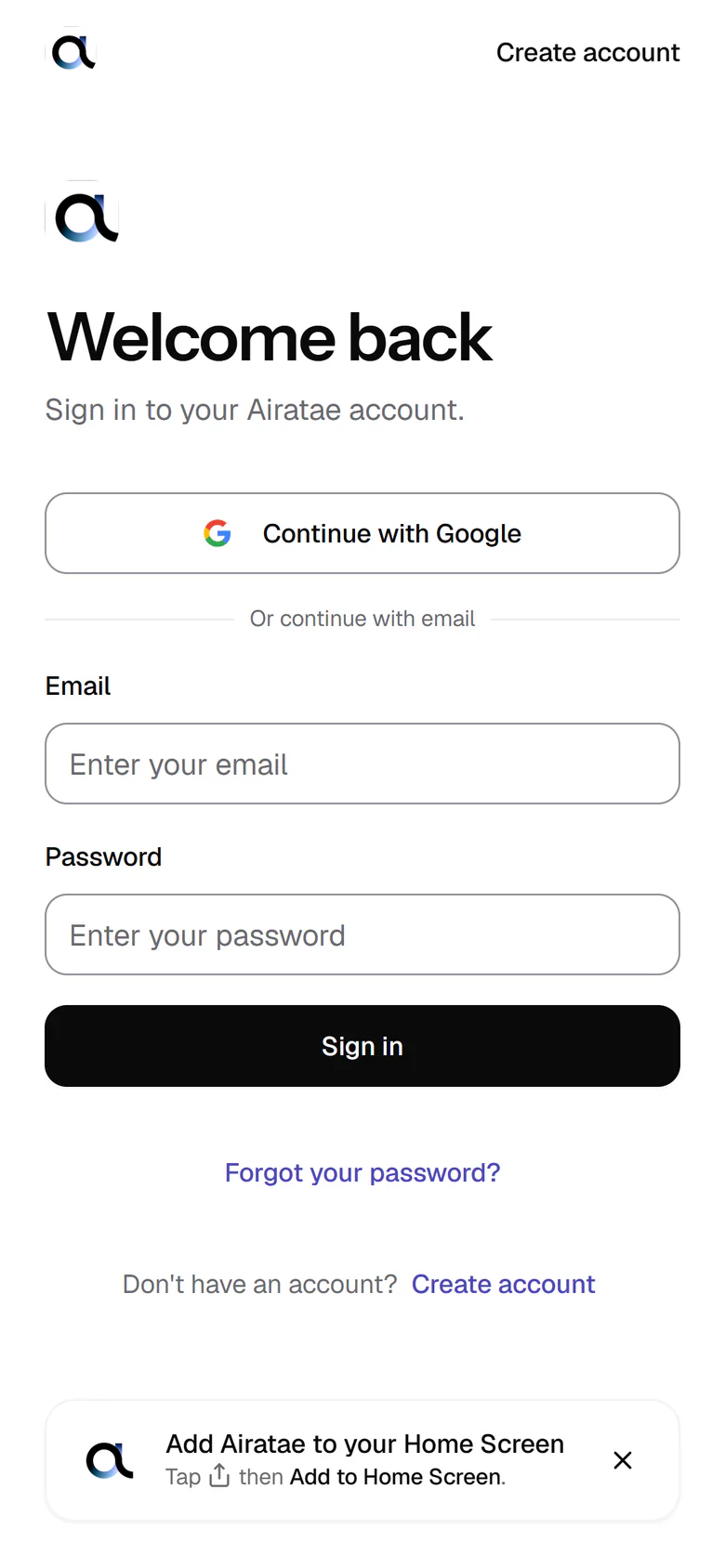
The app’s sign-in screen on a phone: Welcome back, Continue with Google, or email and password with a Sign in button, Forgot your password? and Create account, and at the bottom the app’s prompt, Add Airatae to your Home Screen: tap Share, then Add to Home Screen.
The real sign-in screen on app.airatae.com, with the app’s own Add to Home Screen prompt.
  1. “The app shell: installable, bottom tab bar, center Post button, phone-first layouts”

    Delivered

    Installs from a link, with an offline page and a one-time install guide. Three tabs, Explore, Create and Dashboard, with Create in the center. Phone-first layouts that respect notches and home bars.

    Install and notch checks on your own iPhone and Android at the walkthrough.

  2. “Sign in fixed end to end: password reset, Google, onboarding, no dead ends”

    Delivered

    Password reset has a real page, an interrupted Google sign-in recovers, and new accounts land on setup instead of dead ends.

    Repeat reset and Google sign-in on app.airatae.com at the walkthrough.

  3. “Design system tidy-up: one palette, one type scale, real glass and pill components”

    Delivered

    One palette, one type scale, and real Pill and Glass components across the app, with keyboard and tap-target problems fixed along the way.

  4. “New marketing website: story, proof, one clear call to action”

    Live

    A continuous story told by one pin: hero film, photography, the real app on a phone, and one clear way in. The proof section waits for your real stories.

    Add real stories or testimonials as the proof, show teams as live and photo proof as coming, and give the copy a final read.

  5. “You’ll see: the new site and the new app shell on preview links, on your phone, plus a one-page security sign-off you can keep.”

    With you

    Both are past preview and live on your domain. The sign-off exists; a refreshed, re-dated version is next.

    Walk through on your phones, hand over the refreshed sign-off, confirm Sprint 1 in writing.

It’s live. Open it on your phone.

airatae.com explains the idea and invites people in. app.airatae.com is where people find needs, connect and get to work.

airatae.com

One pin carries the story, from a need on the map to the app on your phone.

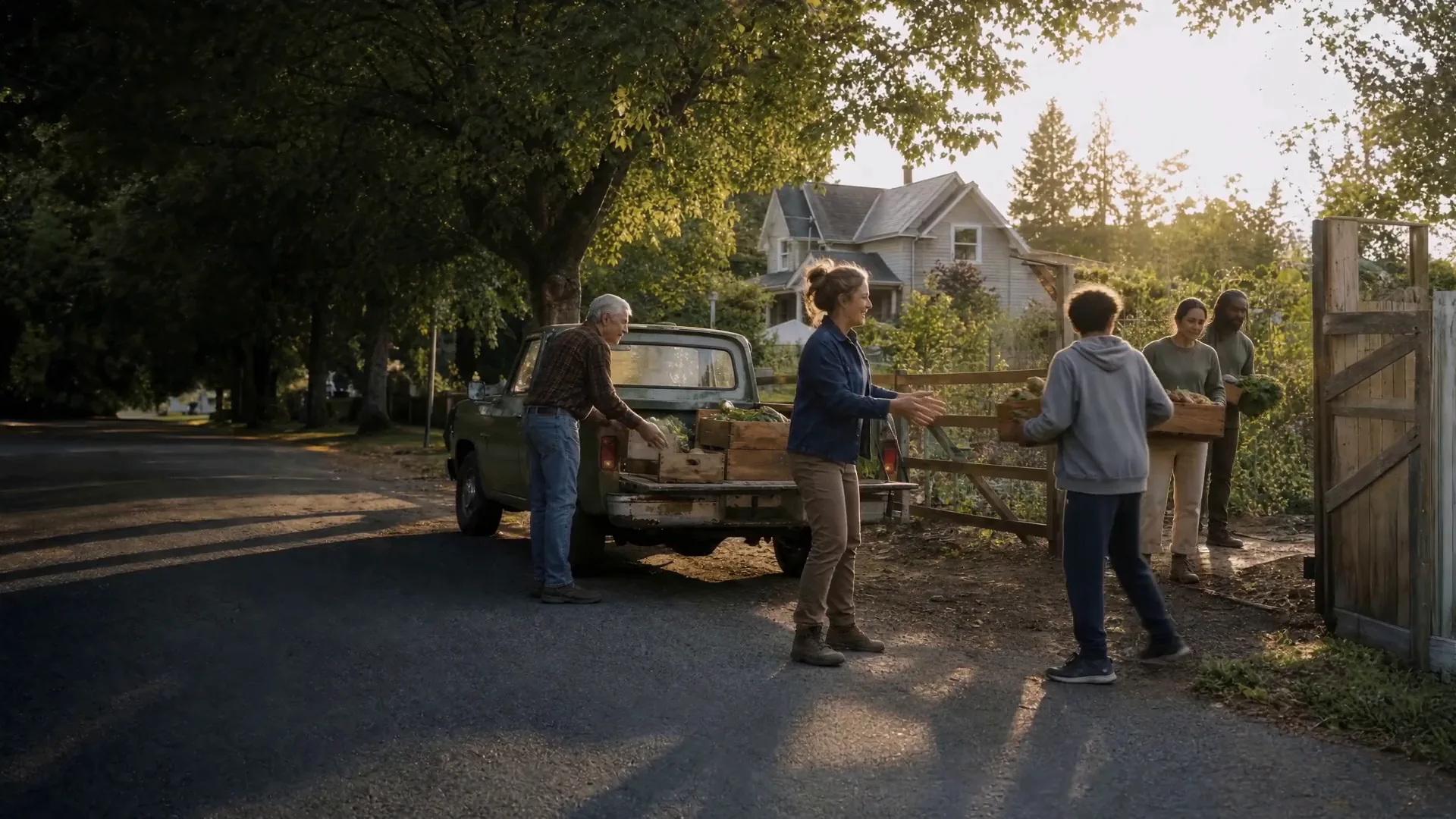
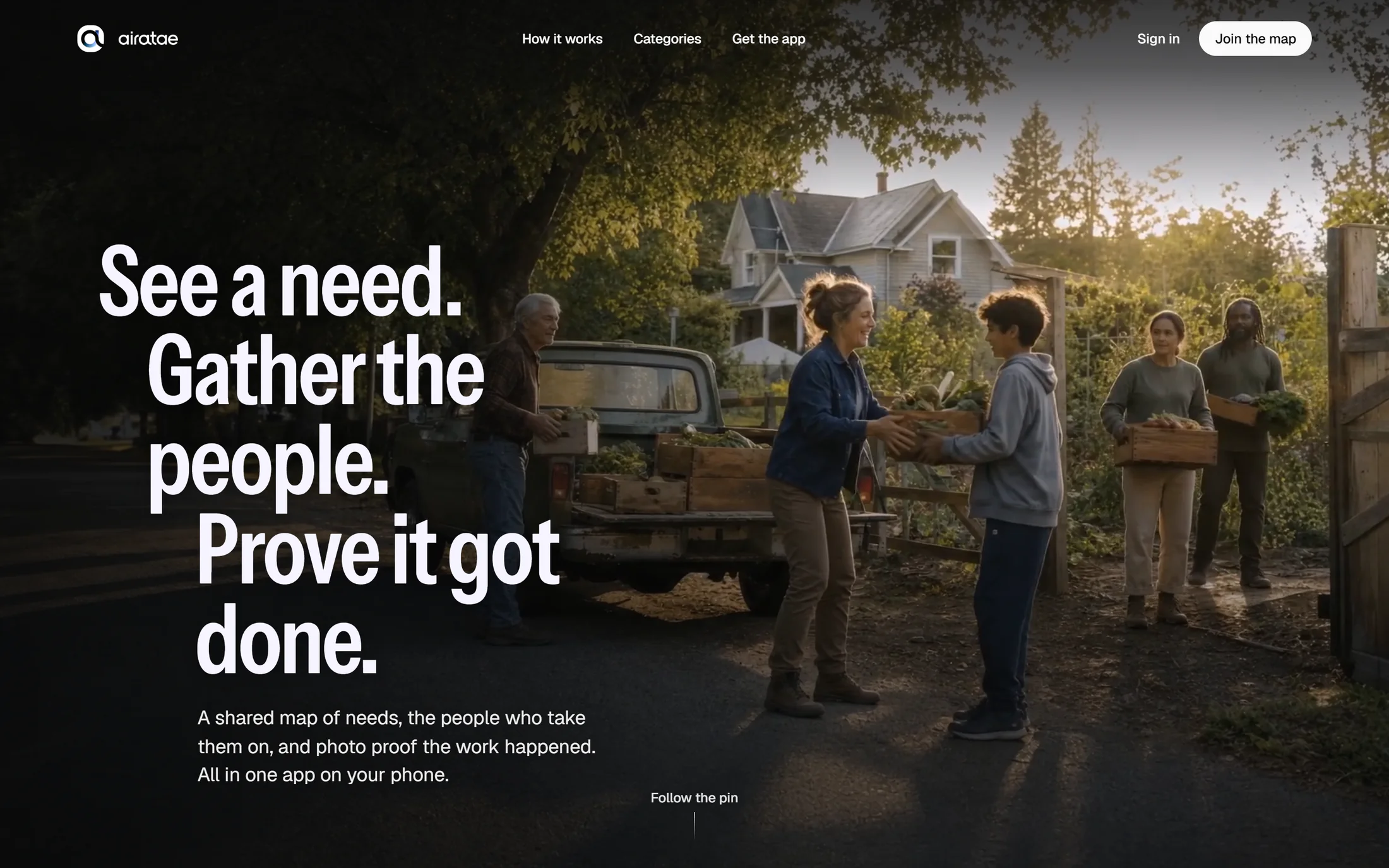
airatae.com on a laptop: the hero film behind the headline “See a need. Gather the people. Prove it got done.”
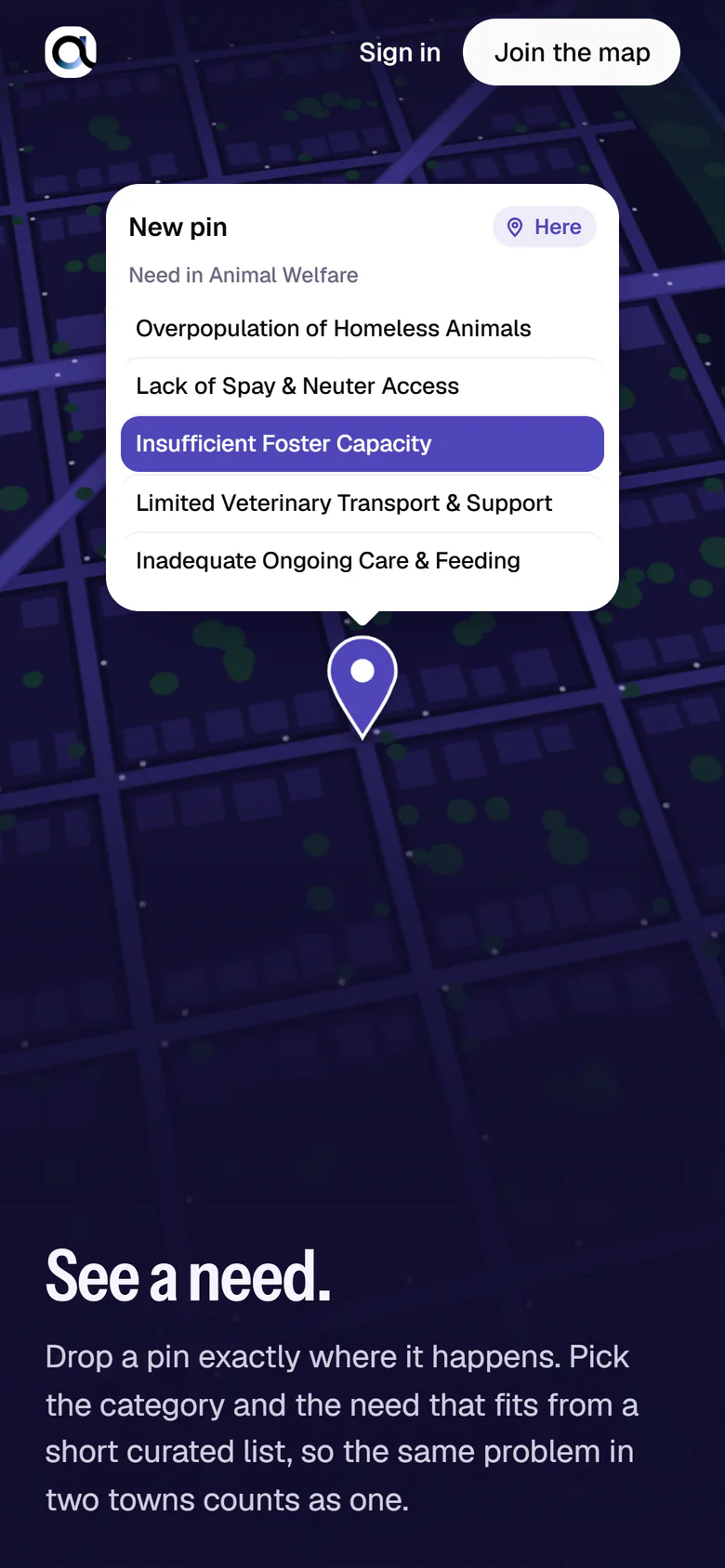
airatae.com on a phone: a pin on the night map with its “New pin” card and a need picked.
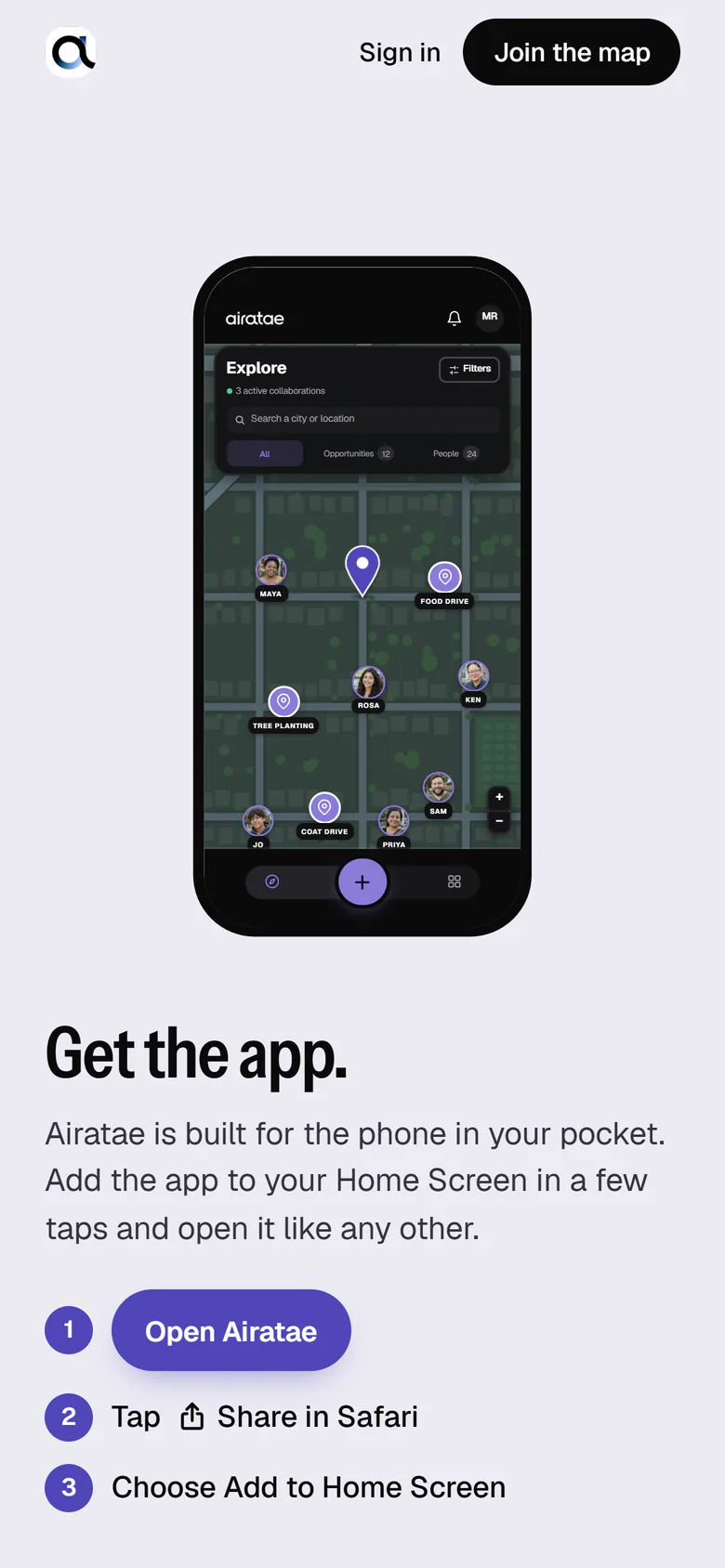
airatae.com on a phone: the app’s Explore screen inside a phone, above “Get the app.” and its install steps.
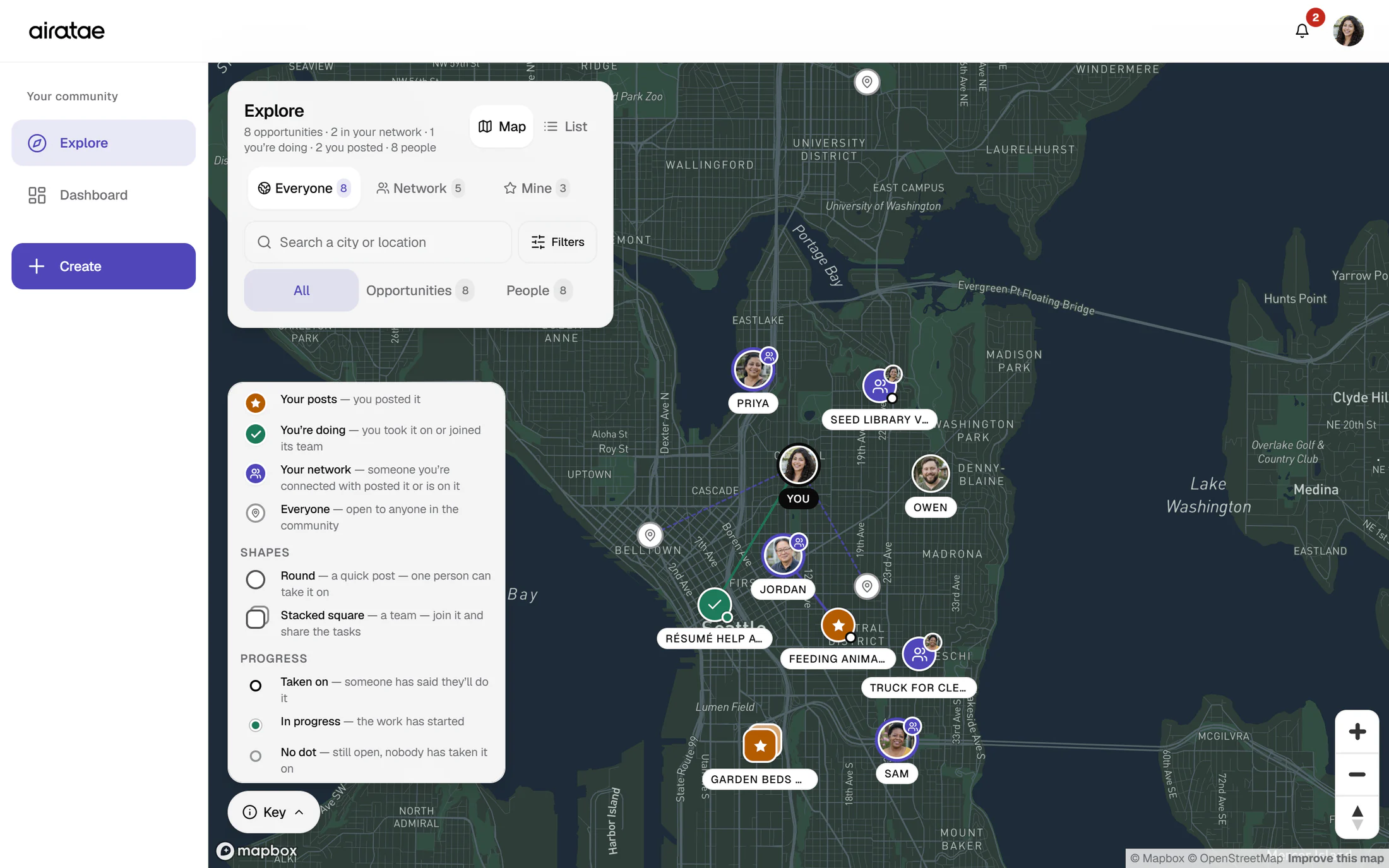
Explore at laptop width: a sidebar with Explore, Dashboard and Create; the Explore panel with Map and List, the Everyone, Network and Mine views, search and filters; the map key explaining pin colors, shapes and progress dots; and a dark map of central Seattle with pins, member photos and lines to the work people have taken on.
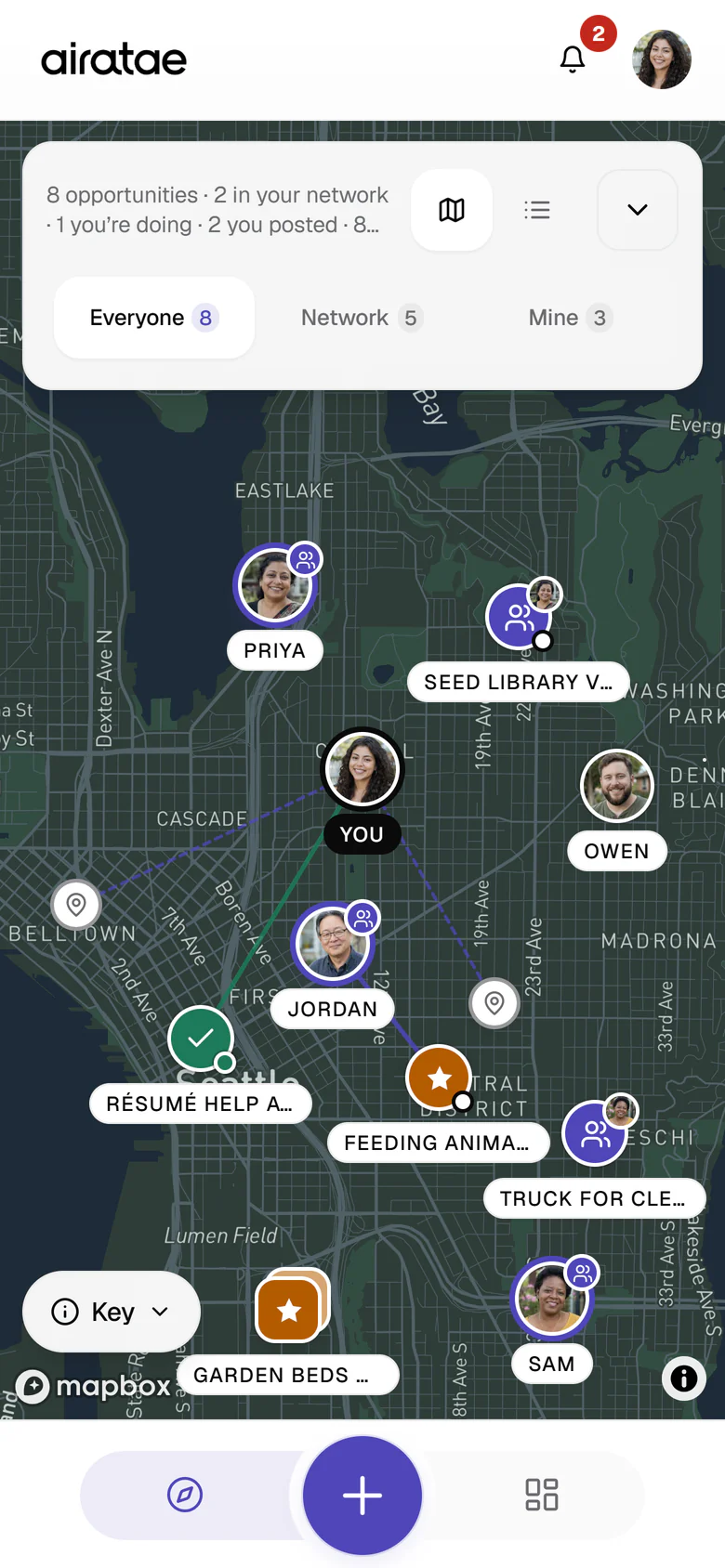
  • The Explore map on a phone with the Everyone view on: 8 opportunities, 2 in your network, 1 you’re doing and 2 you posted. Amber pins mark Maya’s own posts, a green pin the résumé help she is doing, indigo pins with small faces her network’s posts, and plain pins everyone else’s, with lines to the work people have taken on. Round photos show Maya and the people around her, above the Explore, Create and Dashboard tab bar.
    Everyone, your network, or just your own: pins that say whose they are.
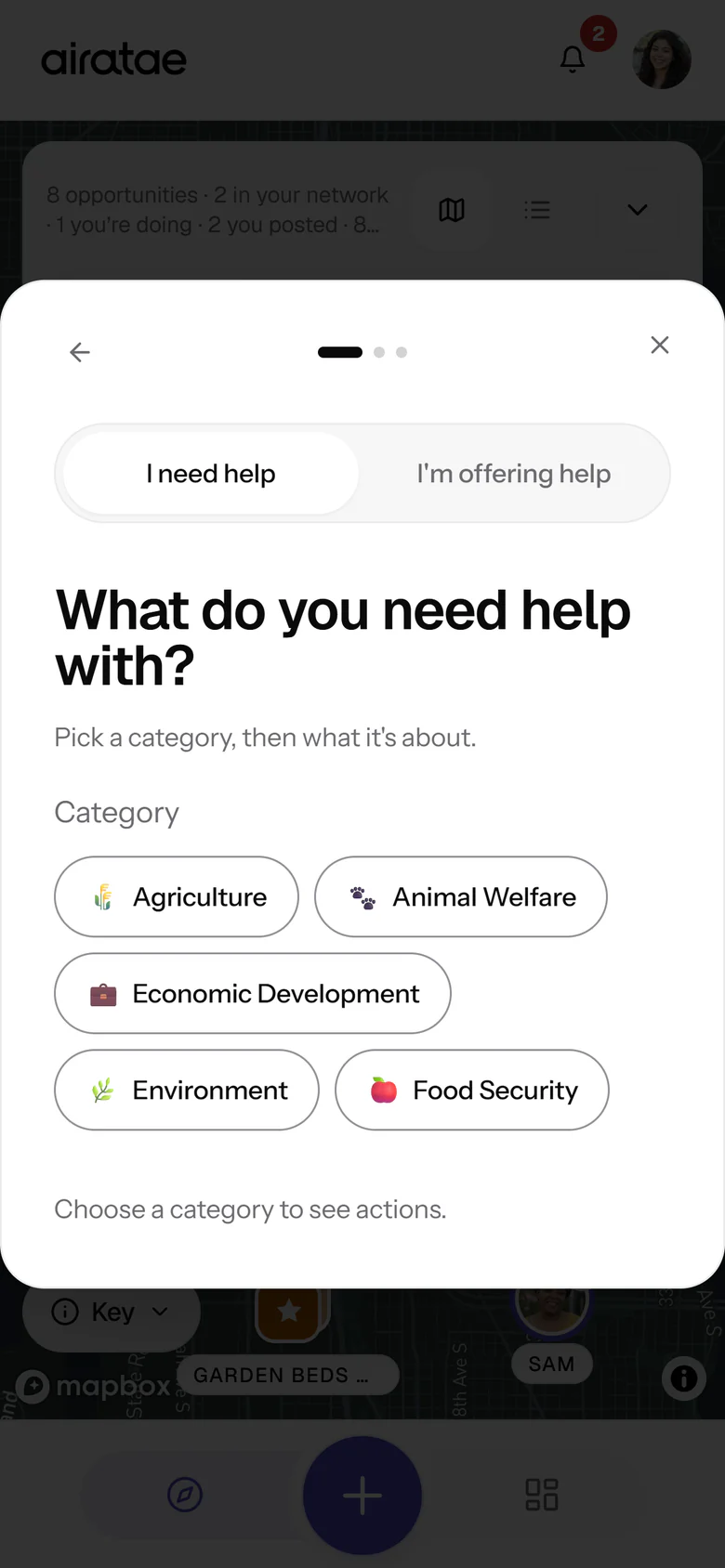
  • The Create sheet over the map, asking “What do you need help with?”, with a switch between I need help, selected, and I’m offering help, the five categories Agriculture, Animal Welfare, Economic Development, Environment and Food Security, and the hint Choose a category to see actions.
    Posting starts with a simple choice: I need help, or I’m offering help.
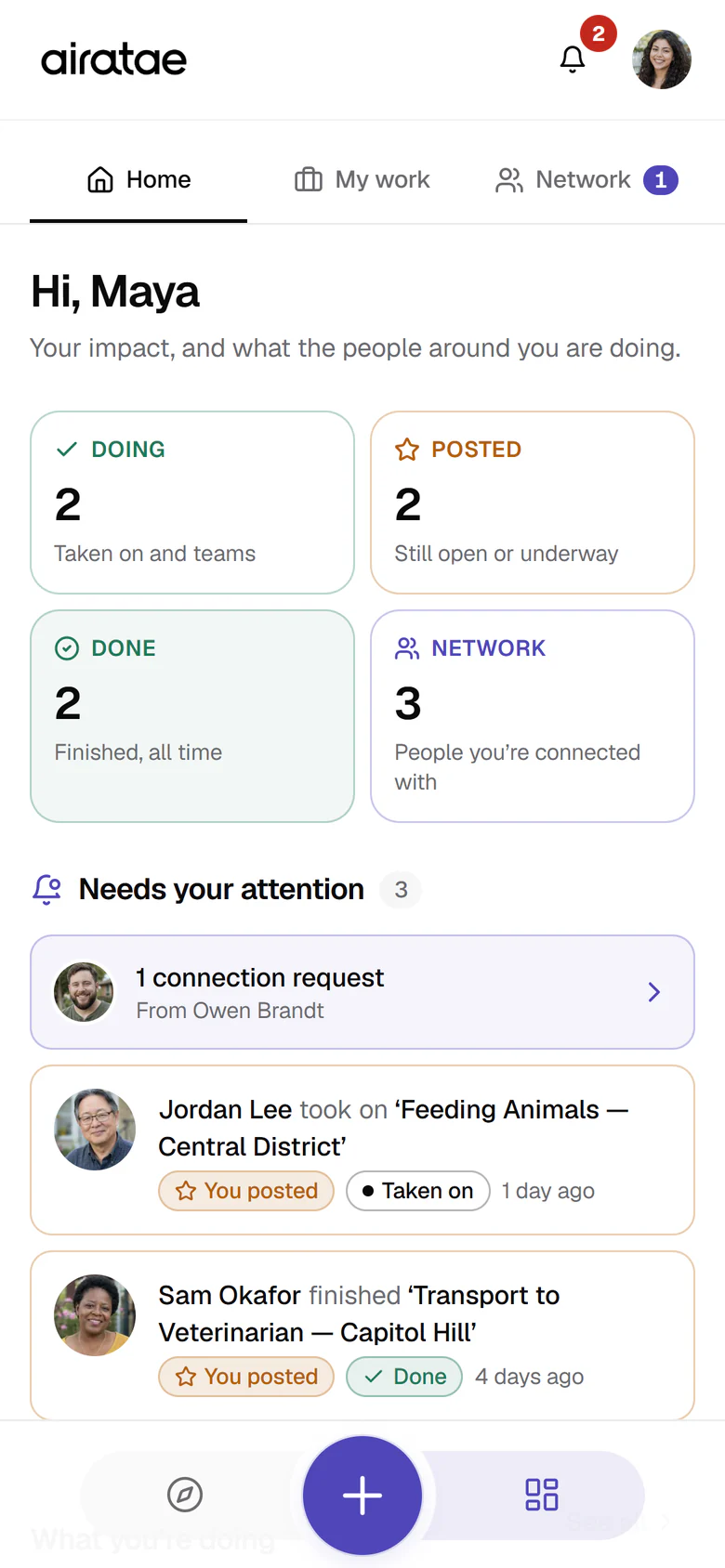
  • The Dashboard’s Home tab greeting Maya, with four tiles, Doing 2, Posted 2, Done 2 and Network 3, and Needs your attention: a connection request from Owen Brandt, Jordan Lee taking on her post Feeding Animals in the Central District, and Sam Okafor finishing her post Transport to Veterinarian on Capitol Hill.
    Home puts your impact first, then whatever needs you now.
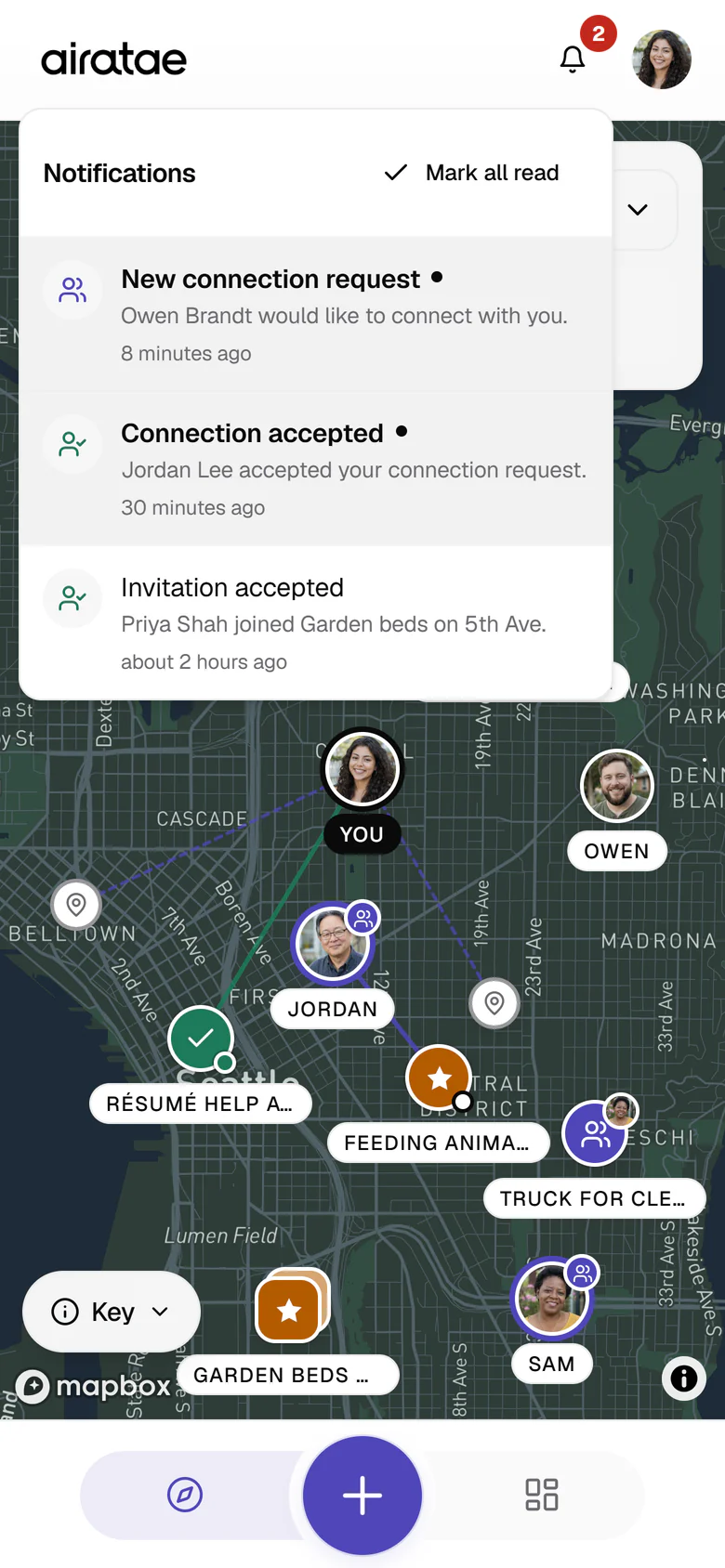
  • The notifications panel open over the Explore map: two unread notes, a new connection request from Owen Brandt and Jordan Lee accepting a connection, and an earlier note that Priya Shah joined Garden beds on 5th Ave.
    A note when someone wants to connect or joins your team.
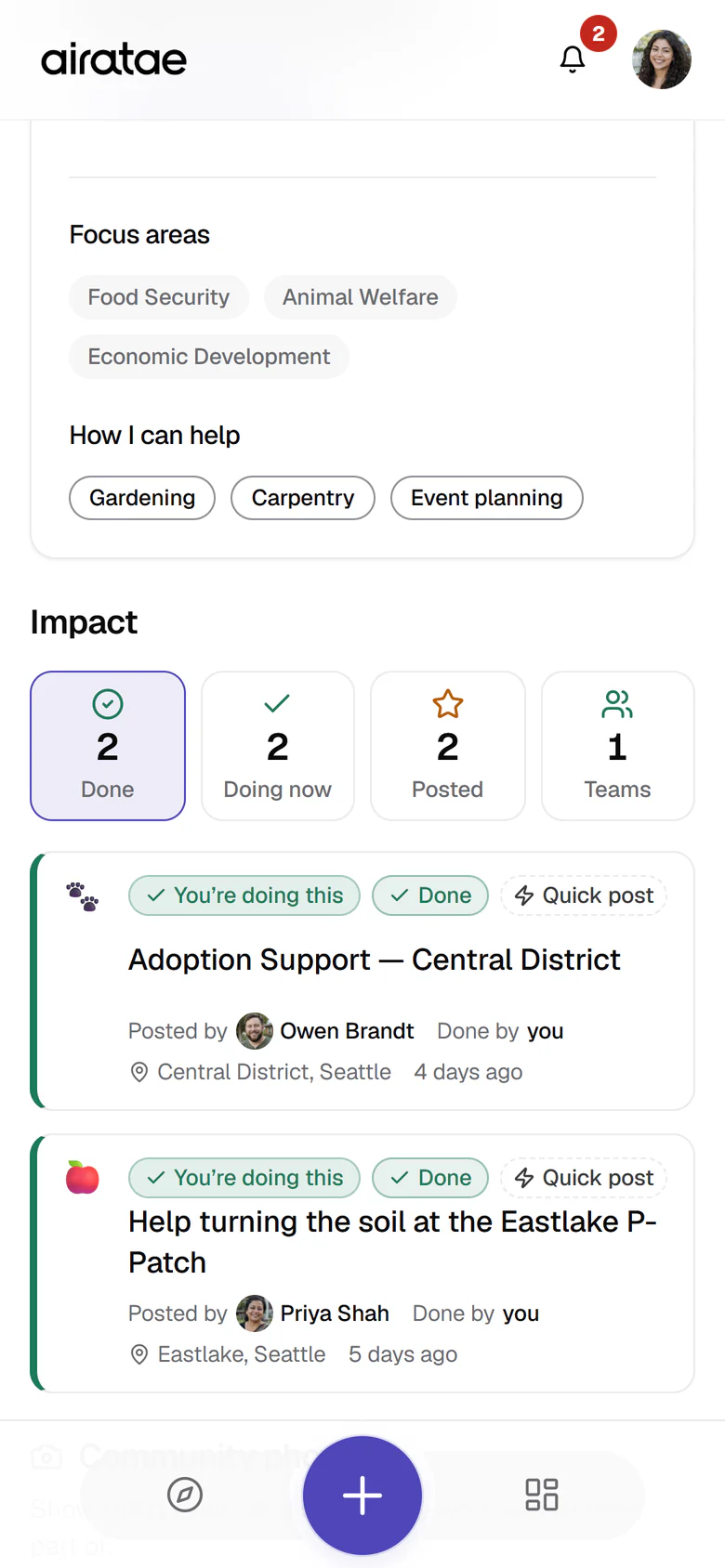
  • Maya’s own profile, scrolled to her focus areas, Food Security, Animal Welfare and Economic Development, and how she can help, Gardening, Carpentry and Event planning, then Impact with Done 2, Doing now 2, Posted 2 and Teams 1, open on the two jobs she has finished: Adoption Support in the Central District, posted by Owen Brandt, and Help turning the soil at the Eastlake P-Patch, posted by Priya Shah.
    Your profile shows what you care about and the work you’ve done.

App screens show sample data, not real members.

We went further than the first plan.

Five things went beyond the Sprint 1 list. The team workspace and the new Explore are also Sprint 2 groundwork, built early because the foundation was ready for it. All of it is live in the app today.

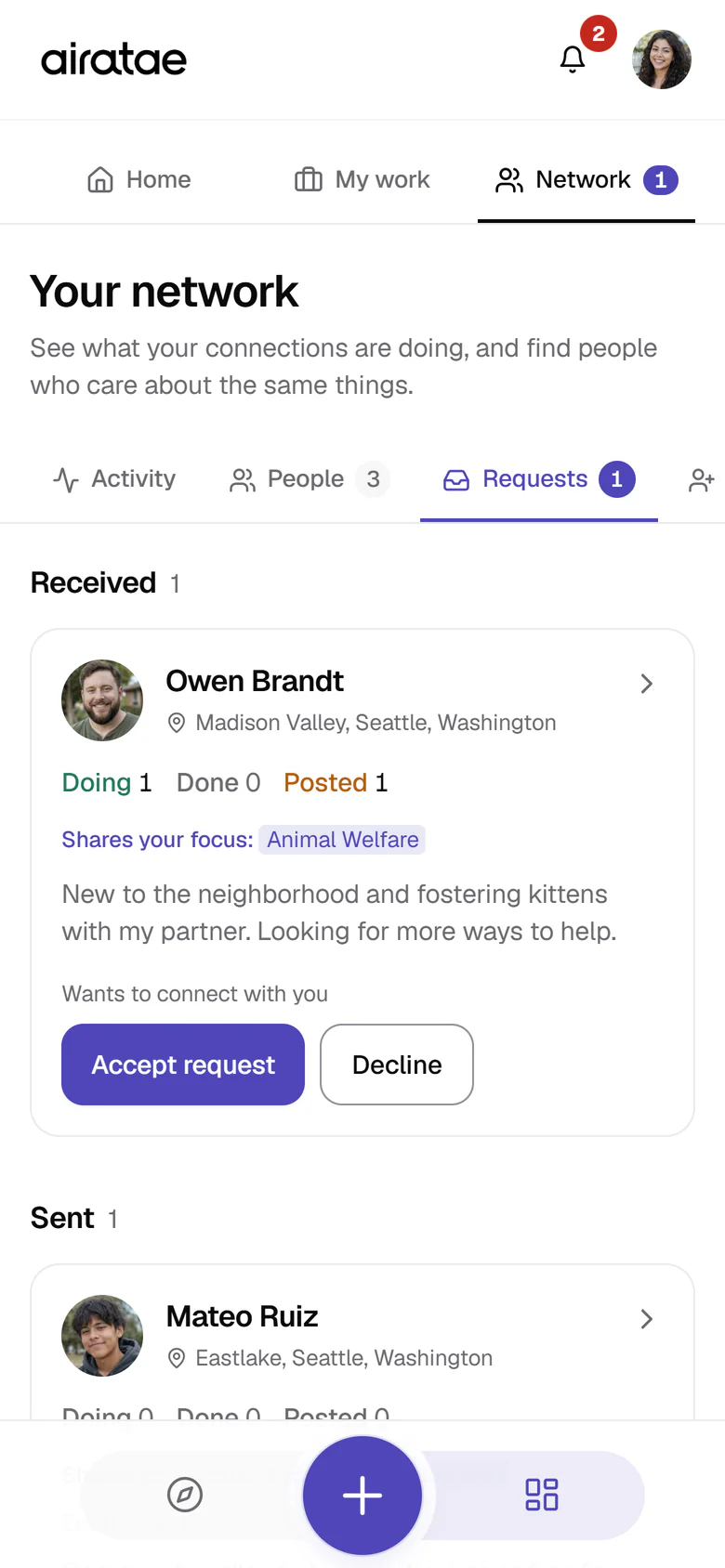
Your network on the Requests view: Owen Brandt from Madison Valley wants to connect, with his public counts, Doing 1, Done 0 and Posted 1, a shared focus on Animal Welfare, his short bio, and Accept request and Decline buttons; below, one sent request to Mateo Ruiz.

Connect with people

Send a request, accept or decline, cancel or remove. You see which requests are pending and who’s mutual, and hear about it in the app when it matters. Only the two people involved can see a connection.

Live since 24 Sep, refined 29 Sep

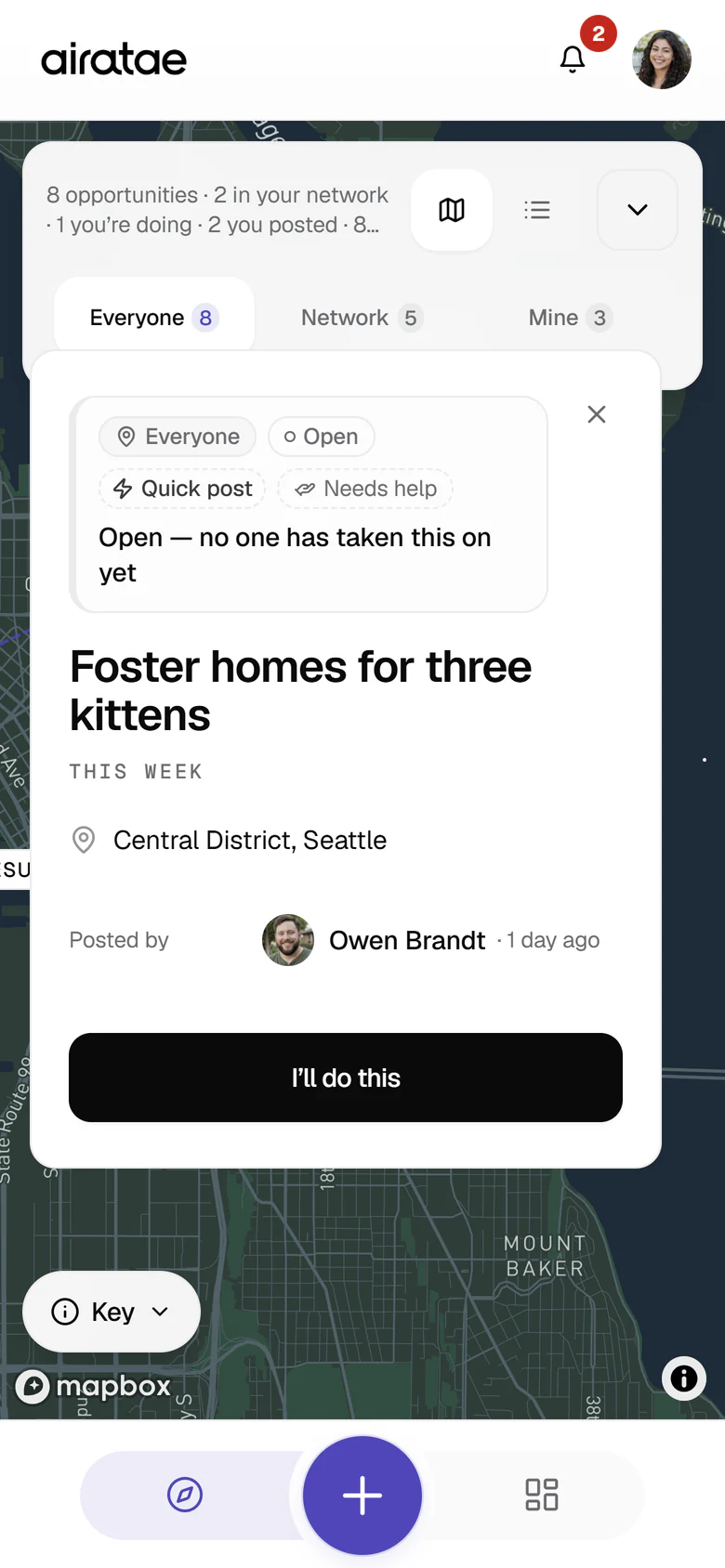
A card opened from a map pin: Foster homes for three kittens, open, with the line Open, no one has taken this on yet, needed this week in the Central District, Seattle, posted by Owen Brandt, with an I’ll do this button.

Take on a job

Helpers can claim a need, start it and mark it finished. Owners can release or reopen it, finished work shows on the dashboard, and two people can’t claim the same job at once. Marking it finished is a simple status for now; finishing with a photo as proof comes next.

Live since 24 Sep

Work as a team

Start a public or private team (in the app, a “collaboration”) around a goal. Invite people, give them roles (organizer, co-organizer, member), add actions and tasks, assign them, and follow progress, team updates and notifications in one People, Tasks and Activity workspace.

Live since 29 Sep

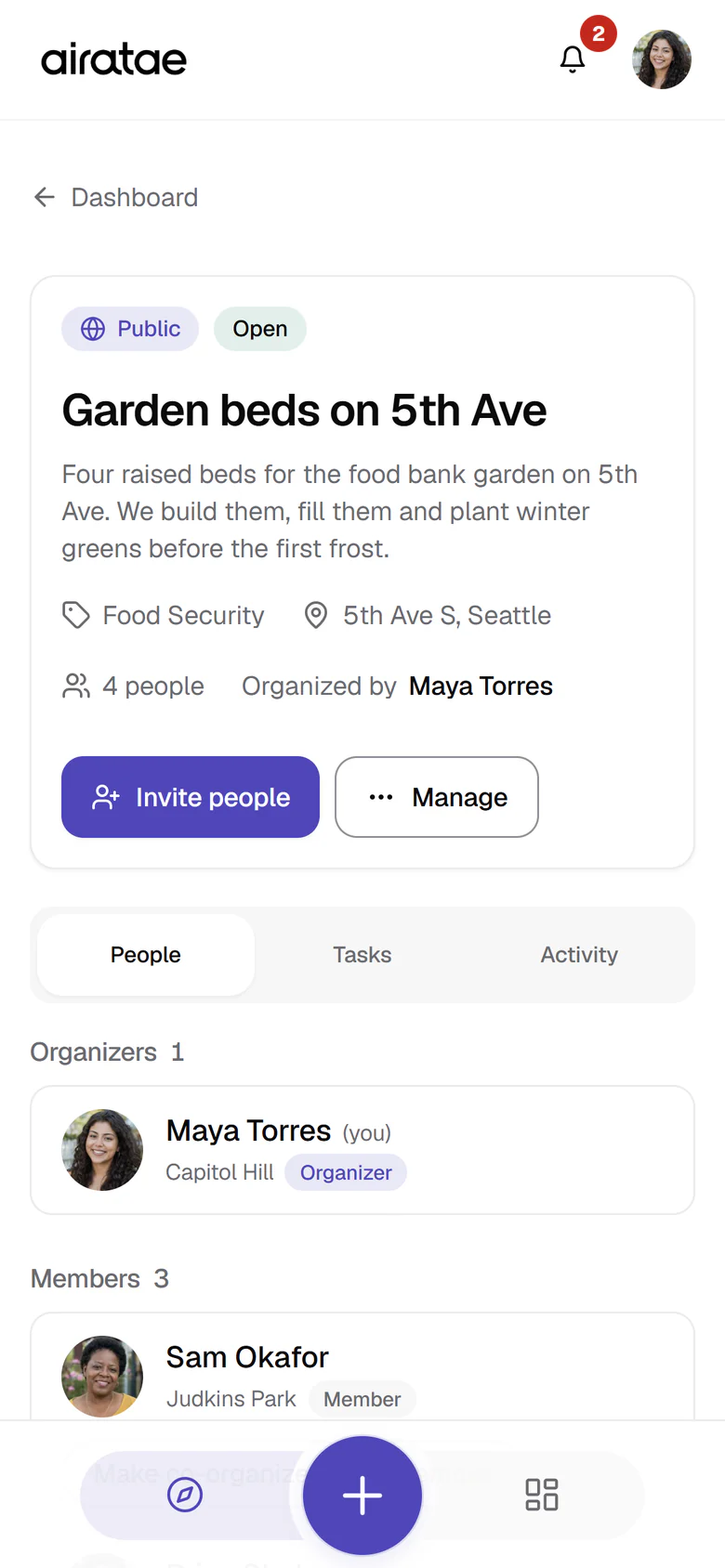
  • The workspace for the public team Garden beds on 5th Ave: its description, Food Security category, 5th Ave S location, four people with Maya Torres as organizer, Invite people and Manage buttons, and the People tab listing Maya as organizer and Sam Okafor as a member.
    People: the organizer and members, around one goal.
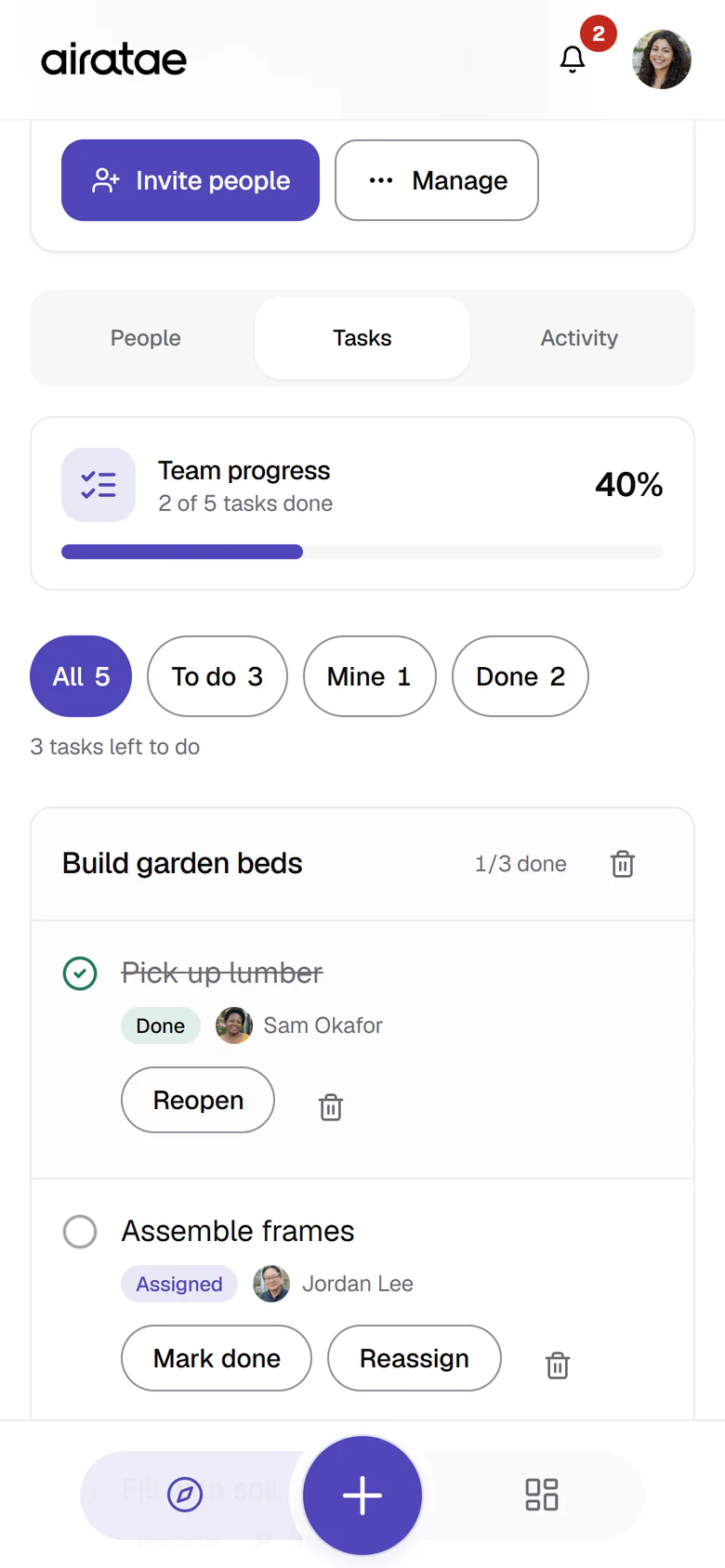
  • The team’s Tasks tab: 2 of 5 tasks done, 40 percent, filters for all, to do, mine and done, and the Build garden beds action with Pick up lumber done by Sam Okafor and Assemble frames assigned to Jordan Lee.
    Tasks: team progress fills as tasks are done.
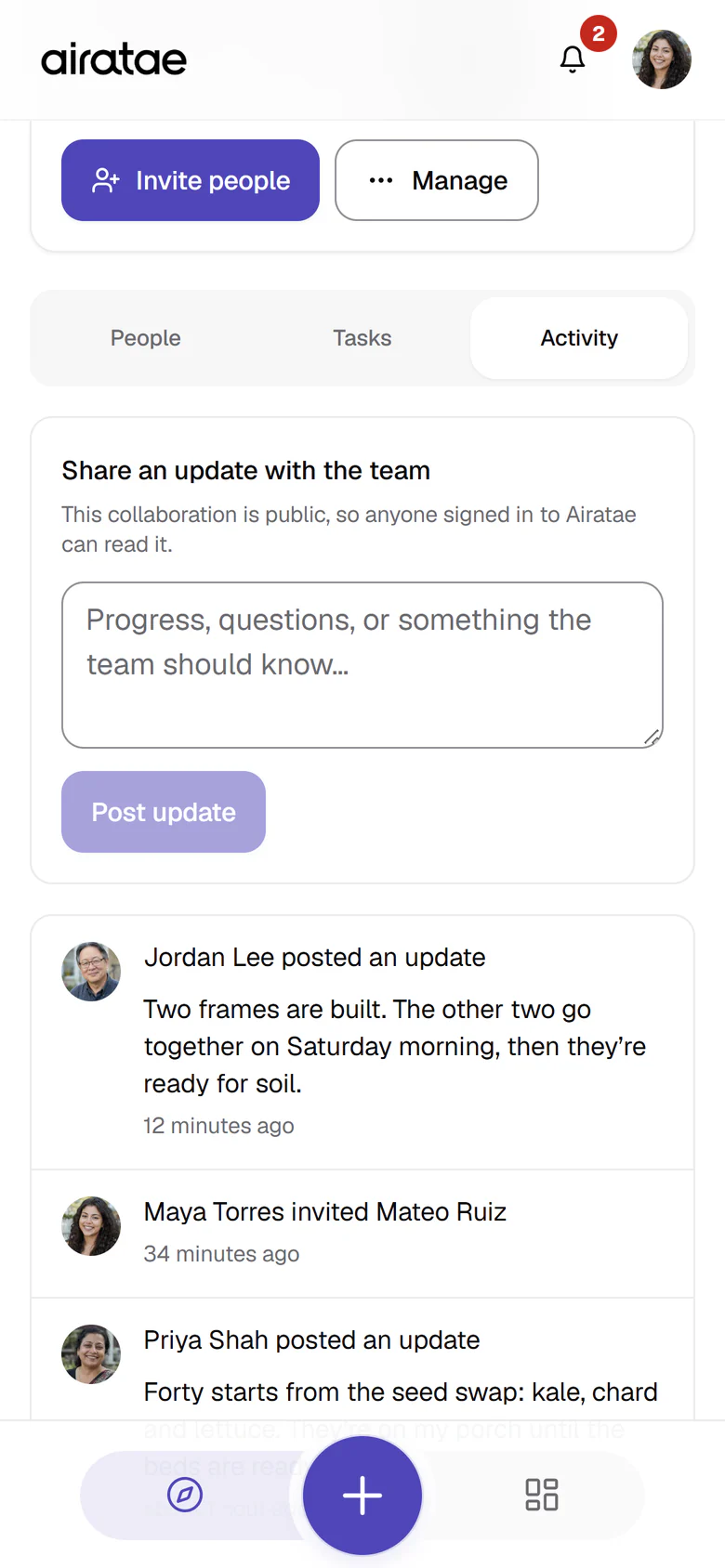
  • The team’s Activity tab: a box to share an update with the team, then a feed with Jordan Lee’s update that two frames are built, Maya Torres inviting Mateo Ruiz, and Priya Shah’s update about forty seedling starts.
    Activity: team updates and every change, in one feed.

See who’s doing what

Explore shows everyone, your network or just your own, on the map or as a list, and each pin says whose it is and how far along it is. The dashboard opens on your impact and what needs you, My work shows who took on each thing you posted, and your network’s activity is one tab away.

Live since 29 Sep

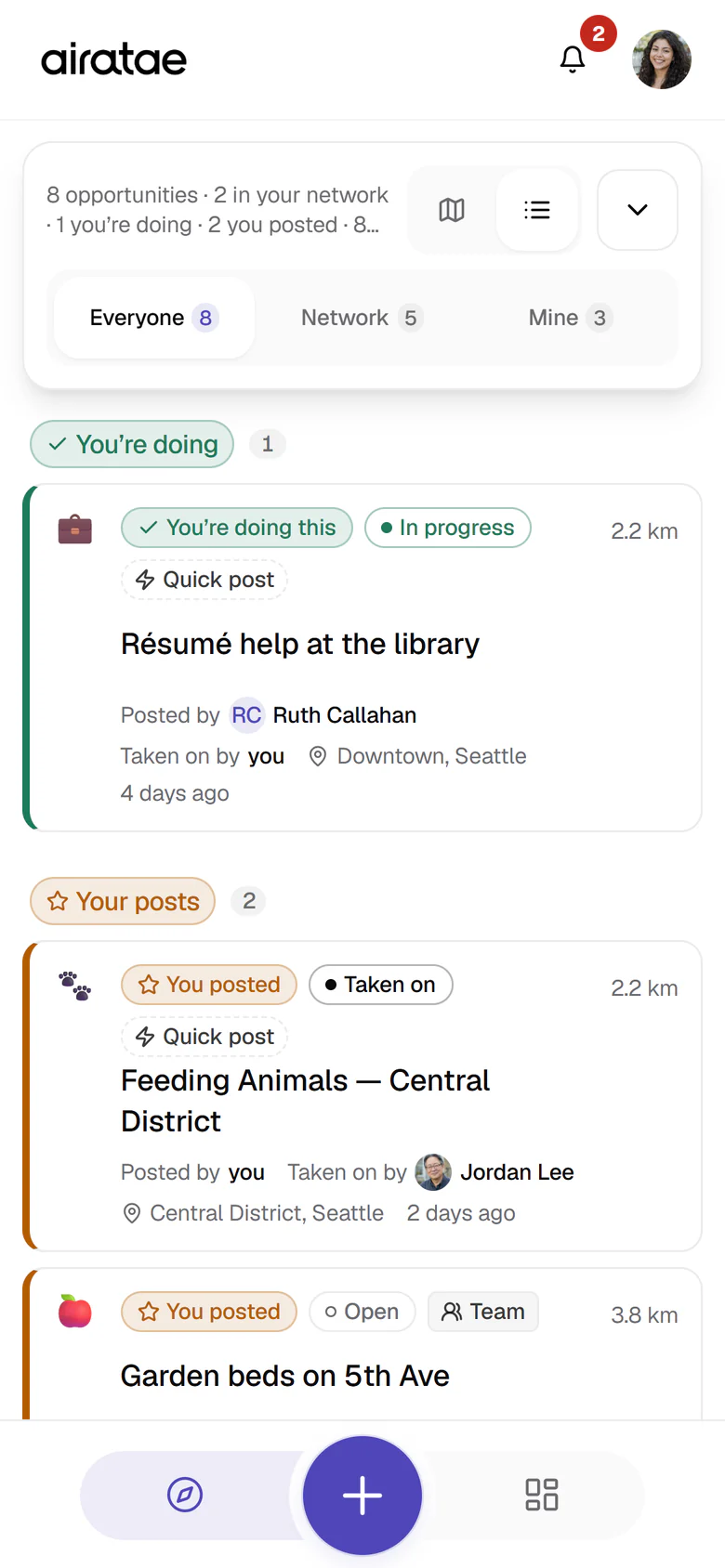
  • Explore as a list, with the Everyone view and List selected: You’re doing first, with Résumé help at the library in progress, then Your posts, with Feeding Animals in the Central District taken on by Jordan Lee, and Garden beds on 5th Ave.
    Explore as a list, grouped by what each post is to you.
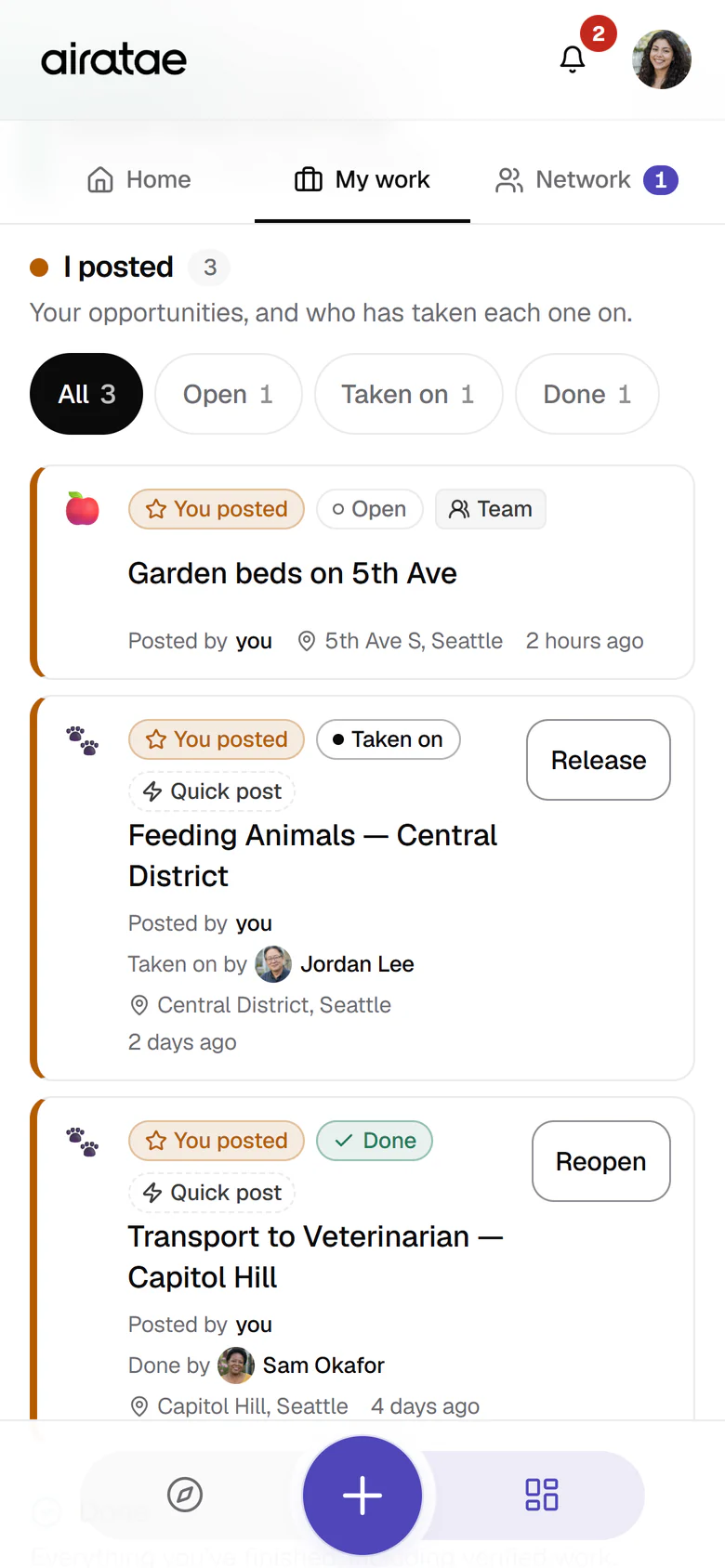
  • My work on the Dashboard, scrolled to I posted, with filters for all, open, taken on and done: Garden beds on 5th Ave, an open team; Feeding Animals in the Central District, taken on by Jordan Lee, with a Release button; and Transport to Veterinarian on Capitol Hill, done by Sam Okafor, with a Reopen button.
    My work: everything you posted, and who took each one on.
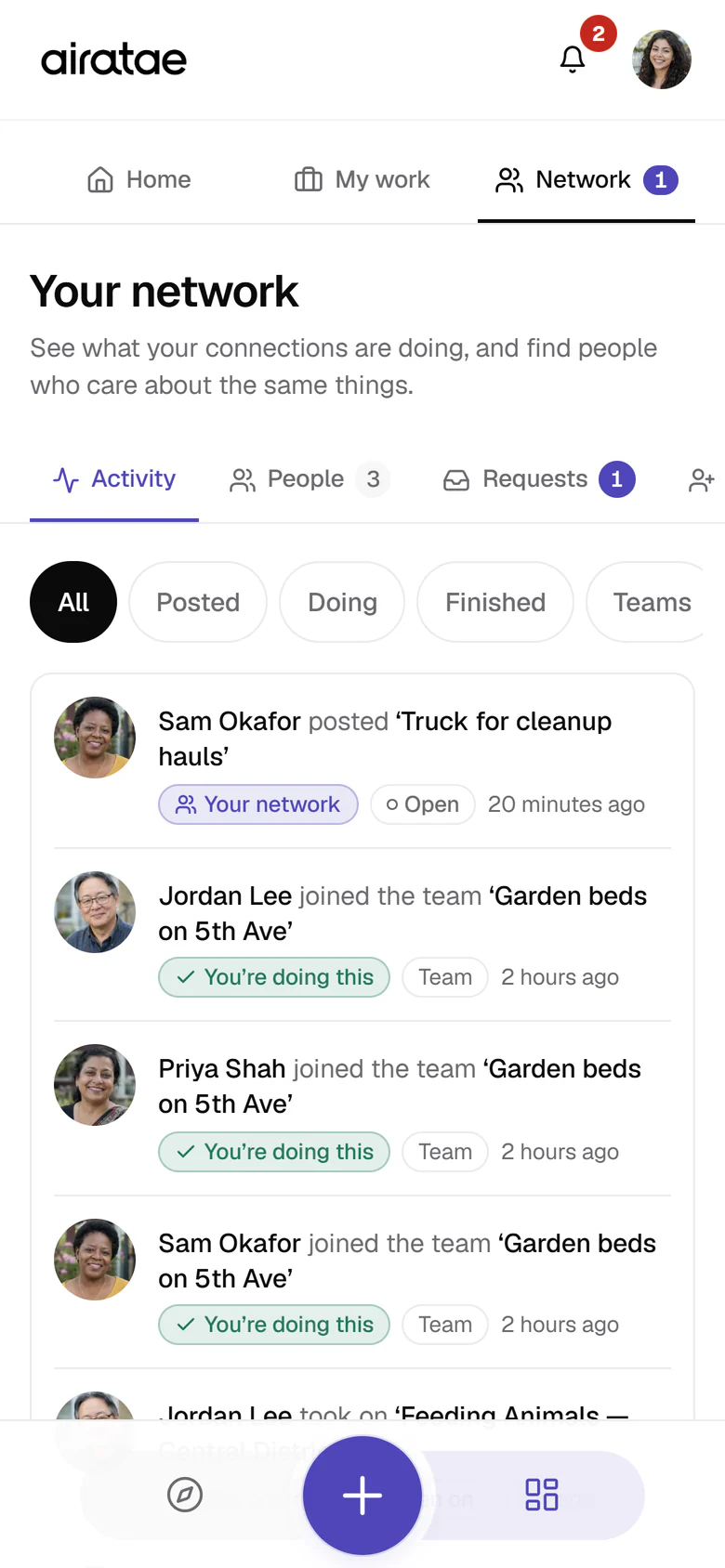
  • Your network on the Activity view, with filters for all, posted, doing, finished and teams: Sam Okafor posted Truck for cleanup hauls, then Jordan Lee, Priya Shah and Sam Okafor each joined the team Garden beds on 5th Ave.
    Your network: what the people you know post, take on and join.

Keep personal details private

Contact details on needs are hidden from anyone who isn’t signed in, a privacy fix beyond the original 17. Since 29 September, who took on a job is visible only to that person, whoever posted it and the taker’s connections; everyone else sees “a community member”.

Live since 15 Sep, extended 29 Sep

Still to build: finishing a task with a photo and rolling completion up from task to action to the whole job, which is the heart of Sprint 2; named roles like Builder or Planter; task history on profiles, part of Sprint 3’s profile work; and turning an existing post into a team, which no sprint covers yet. We’ll place that when we agree Sprint 2.

Better in everyday use

The everyday details also went deeper than Sprint 1 asked, bringing forward some of Sprint 3’s accessibility work.

  • 71

    small controls made big enough for a thumb

  • 45

    controls repaired for keyboard use

  • 84%

    less shared app code for a phone to load first

    135.5 kB to 21.6 kB (kilobytes, compressed)

  • 86

    places now built from one shared set of buttons and panels

  • Installed apps update without losing what you were typing.
  • People stay signed in on weak connections.
  • The map loads only when it’s needed and stops draining batteries.
  • Existing photo uploads repaired and resized.
  • The website plays smoothly on phones held upright or sideways, and calms down for anyone who prefers less motion.

Four things close Sprint 1, and we do them together.

The build is complete. Acceptance is yours to give, once you’ve tried it yourselves.

  1. Walk through it on your phones

    Install the app on an iPhone and an Android, open it from the home screen, and check notches and one-handed use. We’ll repeat Google sign-in and a password reset on app.airatae.com while we’re at it.

    Owner: Together

  2. Hand over the refreshed security sign-off

    Updated for the leftover server functions we switched off, the later privacy work and the new features, then re-checked against the app as it is today and dated.

    Owner: Britt

  3. Finish the words

    Bring Privacy and Terms in line with today’s features, show teams as live and photo proof as coming on airatae.com, add real stories or testimonials to the website, and give the copy a final read.

    Owners: Britt and Andrea

  4. Confirm Sprint 1 in writing

    A short written OK that Sprint 1 is accepted.

    Owners: Andrea and Dennis

Next: prove it got done.

“Prove it got done” is the line that makes Airatae different. Anyone can post a need; Airatae shows it was met. Seeing a need and gathering the people are live. Proving it got done is what we propose to build next.

The loop from your Simplified MVP

  1. Opportunity

    Post a need

    Live

  2. One person or a team

    Take it on alone or together

    Live

    Turning an existing post into a team: not built yet

  3. Actions

    Break the work into actions

    Live in teams

    Action lists: Animal Welfare’s final list is in, four more to come

  4. Tasks, people and roles

    Who does what

    Live in teams

    Named roles, like Builder or Planter: next

You are here

  1. Photo

    Finish a task with a photo

    Next

  2. Complete

    Completion rolls up: task, action, job

    Next

    Tasks and single jobs can be marked done today, without a photo

  3. Outcome

    A visible record of what changed

    Later

A note on words: in the app, a need, a post and an opportunity are the same thing, a pin on the map, and an offer of help is one too. A job is a need someone has taken on, and a team is what the app also calls a collaboration.

Sprint 2 · Close the loop

Next

As proposed: weeks 5–9, $6,240. Post it, organize it, complete it with a photo.

  • Largely live since 29 Sep Collaboration workspace on real data: add actions, tasks and people (roles are organizer, co-organizer and member today; named roles like Builder or Planter are still to build)
  • Partly live Activity and notifications for the moments that matter (live for connections, teams and your network’s activity; completion moments to add)
  • Partly live Create opportunity: proactive or reactive, category, action, place, photo, one or many (need or offer, category, action, place, and one person or a team are live; a photo can be added but doesn’t show anywhere yet)
  • Partly live Action lists for every category (Animal Welfare’s final list is in; the other four show draft actions until Andrea supplies their final ten)
  • Partly live Explore map rebuilt: grouped pins, a list fallback, an opportunity sheet (the list view is live and a tapped pin opens its details; grouped pins to build)
  • To build Complete a task with a photo, and roll it up: action done, opportunity done (tasks can already be marked done in a team, without a photo)
  • To build Empty, loading and error states written the way a person would say them
  • To do Tested on real iPhones and Androids: two accounts run the whole loop

Because the team workspace, the list view and the new way of posting are already live, Sprint 2 starts further along. Before you decide, we’ll go through this list together and agree what’s left and the dates.

Sprint 3 · Outcomes, polish, launch

Later

As proposed: weeks 10–13, $2,810.

  • Outcome record and page: title, place, category, photos, people, date
  • Outcomes feed and a completed layer on the map
  • Profile with history: started, helped, recent outcomes
  • Design pass on every screen, phone and laptop
  • Accessibility, analytics and error monitoring you can actually read
  • Legal pages and backups verified
  • Private beta with 10 to 20 people you choose
  • Launch checklist signed off together, then live

Some groundwork is already done: the app’s own domain, installation, legal pages, accessibility fixes, and profiles that show the work people have done.

The retainer continues alongside: $1,250 every two weeks for calls, UX and UI input, and fixes.

Later, once the loop is proven: the financial layer, an assistant that turns “I want to help” into a post, and a verified impact record. Scoped separately.

What we each do next.

  • Britt

    Build and check

    • Recheck install and sign-in on app.airatae.com.
    • Refresh the security sign-off, Privacy and Terms.
    • Prepare the team workspace demo.
  • Andrea

    Shape what people see

    • Real stories or testimonials for the website.
    • A final read of the website copy.
    • The written OK on Sprint 1, with Dennis, after the walkthrough.
    • The final action lists for Sprint 2: Agriculture, Economic Development, Environment and Food Security, ten actions each. Animal Welfare’s is in.
  • Dennis

    Check the model

    • Review how people, needs, teams and tasks fit together before Sprint 2 builds on them. The team model went live ahead of your review, so what you find can still shape it.
    • Start with the team workspace guide kept with the code, docs/collaborations.md. It also lists what isn’t built yet.
    • Decide which older tables from the first build stay; the database baseline guide lists them.
    • The written OK on Sprint 1, with Andrea.
  • Together

    Review and decide

    • Try the app on your own phones.
    • Agree the scope and dates of the next build.

Next meeting: a live walkthrough on your phones, the team workspace and its data model, and decisions together.

Book the walkthrough Open app.airatae.com (opens in a new tab)

Bring an iPhone and an Android if you have them. If the button doesn’t open your email, write to britt@axleoperations.com.